
Track your Amazon spending in one dashboard.
 No CSVNo manual uploadTracks deliveryTracks returns & refunds
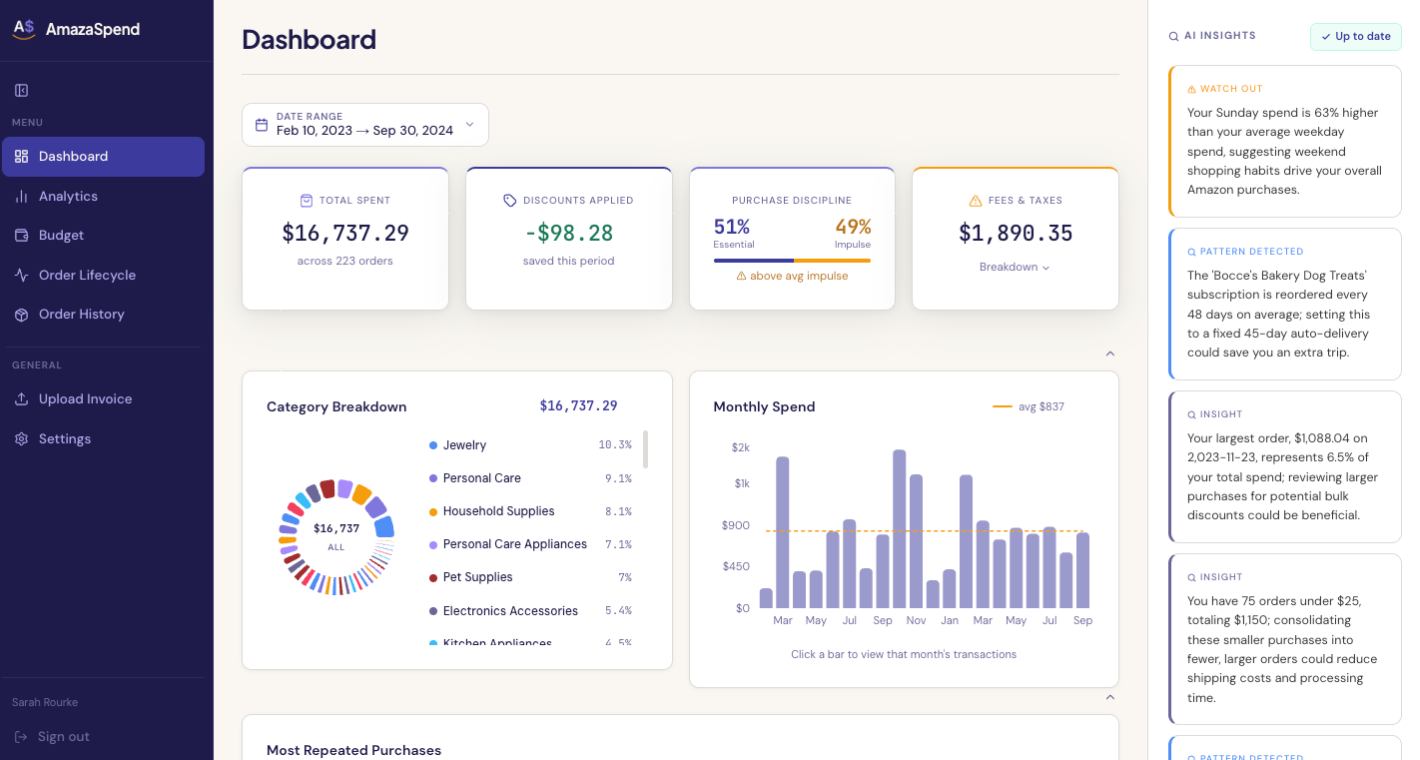
The Amazon spending breakdown Amazon never shows you: every order sorted by category, your spending by month, essential vs impulse buys, and the price trends of items you reorder.
Track your Amazon spending in one dashboard.
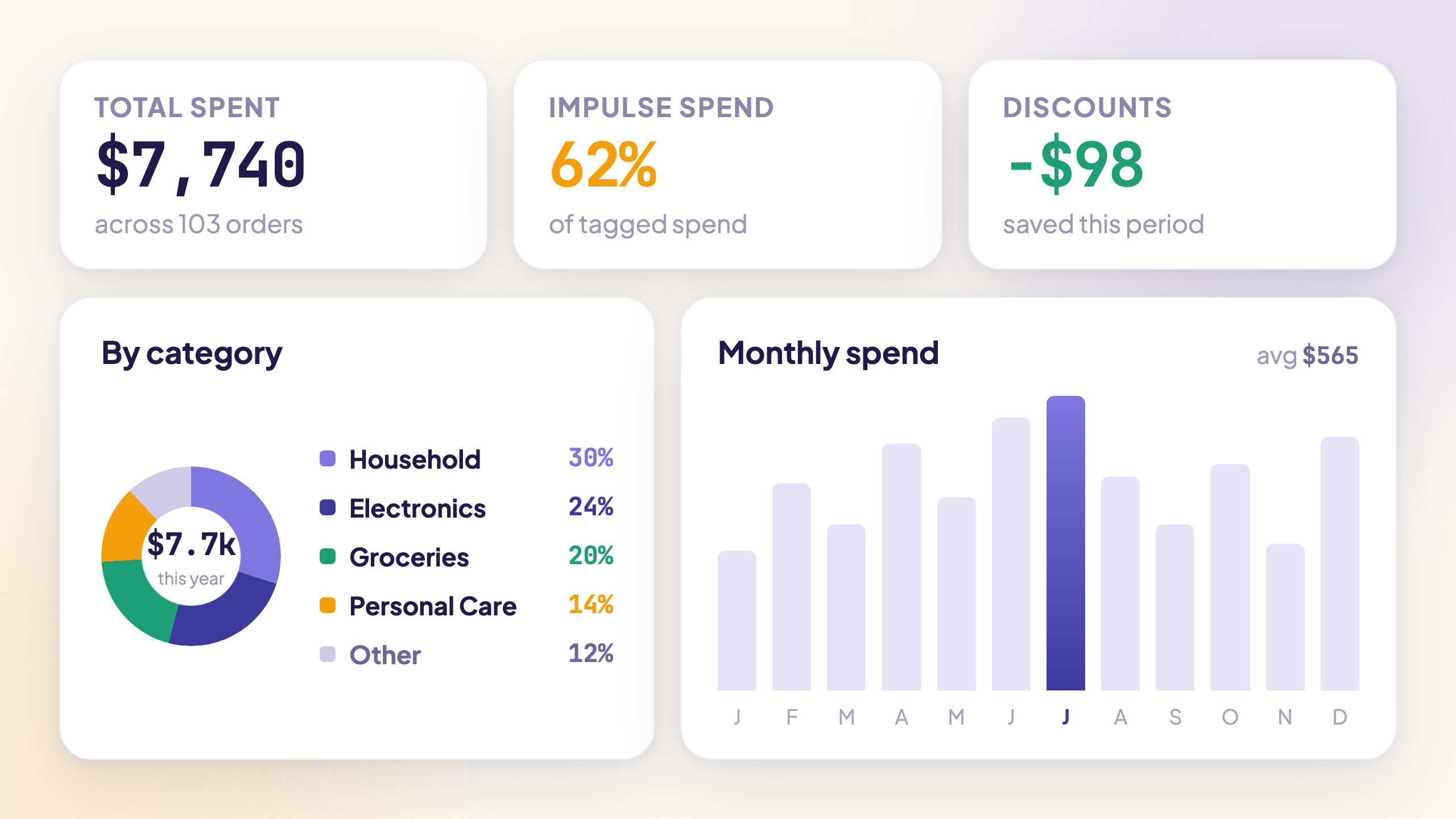
The Amazon spending breakdown Amazon never shows you: every order sorted by category, your spending by month, essential vs impulse buys, and the price trends of items you reorder.
Skip the export. Capture orders as you browse.
Install the AmazaSpend browser extension and it quietly captures every Amazon order, return, and delivery date while you shop. No CSV exports, no manual data entry, ever.

Available for Chrome, Firefox, and Edge · Read-only. Your Amazon password is never stored.
Upload your Amazon order history.
Understand everything.
Three steps from chaos to clarity.
Everything you need to understand your Amazon spending

Your Amazon spending, analyzed. In plain English.
After every upload, get observations specific to you: which categories are creeping up, what your impulse patterns look like, where you're doing well. Your data explained in sentences you can act on.

See exactly what's driving your Amazon spending.
Every purchase gets tagged Essential or Impulse automatically, at the moment it's parsed. See which categories are behind the pattern, how your ratio shifts month to month, and which items keep showing up in your cart.

See how much prices changed over time, on items you already bought.
Track the price history of every item you've purchased. Know when you got a deal, and when you paid too much. Spot subscription discounts and applied coupons automatically. Discover whether that item you buy every month is quietly getting more expensive.

Track every refund from return to repaid.
Follow every return from drop-off to refund credited, with a full timeline of how long each step takes. Always know what you're owed, when it'll land, and what you return most often.

Know on day 14 if you're on track for the whole month.
Set a monthly limit for any group of categories: household, tech, kids, whatever matches how you actually shop. AmazaSpend shows you where you stand right now, projects your month-end total based on your current pace, and turns green, amber, or red so you never have to do the math yourself.

Your entire Amazon history, finally searchable and sortable.
See your total Amazon spending at a glance and answer the question: how much have I spent on Amazon? Every order, item, and return in one scrollable, filterable table. Search by product name, sort by price, filter by category or month, and export everything as a clean CSV.
Your Amazon spending habits, by the numbers.
Amazon makes it easy to buy. AmazaSpend makes it impossible to ignore where it all goes.
Choose Your Plan
Affordable pricing that grows with your spending habits.
- Your full order history
- Auto-categorization
- Refund and returns tracking
- Impulse Tracker & Price Trends
- AI behavioral insights
- Monthly & yearly spending reports
- YNAB + Monarch Money export
- Everything in Pro
- Multi-user seats
- Accounting CSV export
- Priority AI insights
- Dedicated account support
- Tax summary
7-day free trial, then a paid subscription. Cancel anytime · Prices in USD · See full feature comparison
Everything you need to know before uploading.
Stop guessing where your money goes.
Upload your first invoice and see the full picture in minutes after importing your orders.
Start your 7-day free trial →